For a while I have had a problem with YouTube crashing Chrome on my main (Intel i7) computer and Samsung netbook. I did everything from reinstalling chrome to getting different versions of Adobe Flash (as Google Chrome automatically gets its own flash player – and you cant manually upgrade that).
After a chat with a couple of Computer Scientists a few years older than me, one suggested there may be a conflict between the Chrome Adobe Flash and something else – and I suggested Macromedia Firewoks (now Adobe), a rather old image editor that I use. I again started looking into the problem recently, and found suggestions to disable one of the Chrome plugins.
First put “about:plugins” into your chrome address bar, and scroll down to the “Flash” section. Once there, disable the version of Shockwave Flash stored at “C:\Users\<username>\AppData\Local\Google\Chrome\Application\18.0.1025.168\gcswf32.dll” – look for that ending file.
Then enable / leave enabled the version stored at: “C:\Windows\SysWOW64\Macromed\Flash\NPSWF32_11_2_202_235.dll”.
(I also had one located at: “C:\Users\MaTT\AppData\Local\Google\Chrome\User Data\PepperFlash\11.1.31.203\pepflashplayer.dll” which is disabled too).
All seems well now, YouTube doesn’t seem to crash every time I open a few videos!
02 has a service called “Bluebook” that will back up all of your contacts free of charge. It really only supports phones that are more than about 8 years old, as it needs a service called SyncML – something even my ancient iPhone doesn’t have. However, managed to find a way round it! Downloaded a SyncML client (lite) app to my iPhone, popped in some 02′s settings (use actual username, not your email address that 02 tells you is your username) and ctrl+alt+bingo, it sent all of my friends numbers to its site! Also some email addresses etc that were in my contacts book.
Once registered, login and click on Contacts and then “Set up a phone”. The iPhone model won’t be listed so choose another device such as the Nokia N95.
Next download and install the free Synthesis SyncML Client for iPhone from Apple’s App Store and configure it with the following settings:
Server URL: http://o2contacts.o2.co.uk/syncml
SyncML Version: SyncML DS 1.2
User: yourusername@o2.co.uk
Password: yourpassword
Tap on ‘Start Synchronisation’ and marvel as your contacts go whizzing around the ether and appear like magic in your Bluebook account.
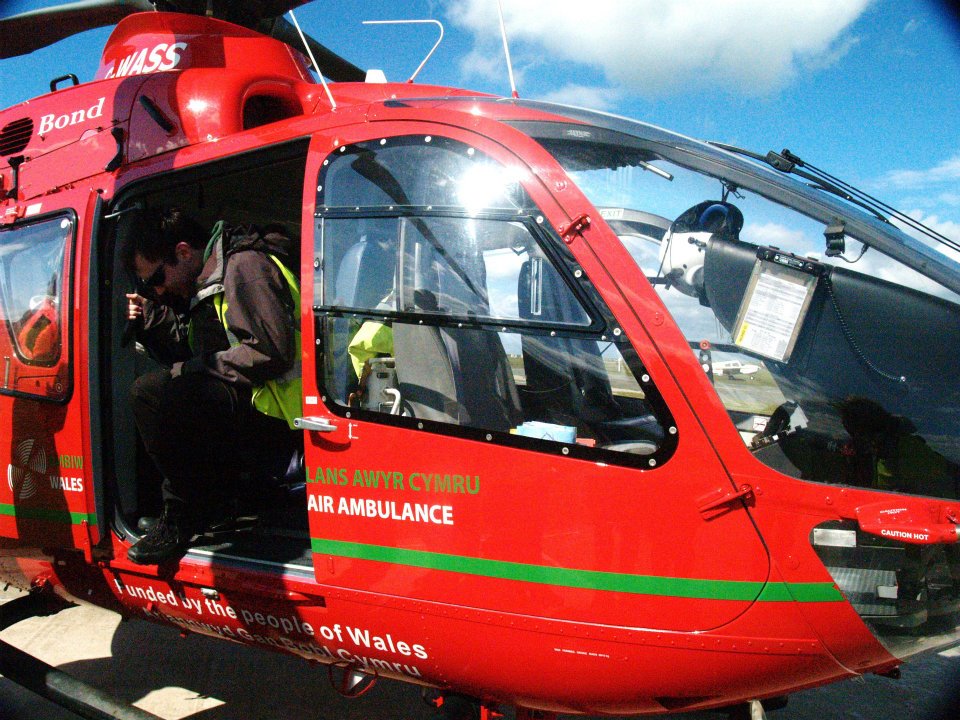
Today, me and some of our first aid division did a trip up to Caernarfon to see the Air Ambulance, and the local ambulance station. Starting off from Aber at 7.40 (>.<) we trekked up to Caernarfon airport – a little air strip by the sea, very nice! As we got there, the Air Ambulance was just landing – and one of the gentlemen that flew in it very kindly showed us around the helicopter.
We saw that the space inside is actually very cramped, barely enough room to tend to a patient, despite having 2 sliding doors (one of which the stretcher slid out of and was held so a patient could be transferred to a bed outside) and a set of opening doors at the back too.
We also saw how the crew can easily work out the time it will roughly take them to get to an incident, using a very inventive magnet on a piece of string. You put the magnet/marker on the place to go, and the string draws a direct line from the air base – indicating the heading on a square compass. Above the map, the string continued passing through painting hanging loops, and along the straight top of the board were little markers for the number of miles the incident was away – and the marker was just a bit of red tape on the string. When the magnetic marker is pulled away from the base, the string travels along with it, and the red marker moves along the “miles” indicators. A very clever, but simple way of working out how far away things are, and on what heading!
We then travelled to Caernarfon’s ambulance station – where Dewi (our trip’s organiser)’s Dad worked. We had a look round a couple of Mercedes Sprinter ambulances, as well as a new Land Rover Discovery.
It was extremely interesting learning what they carried in their NHS ambulances, and how some of it worked. Whilst having a chat with one of the paramedics, I also learned the Merc ambulances contained 2.6 or 3 litre engines, could top 110mph, and weigh up to 5 ton.
The ambulance was called out a couple of times whilst we were visiting, and I got a video of it leaving:
After – we visited Caernarfon’s town centre – and was not overly impressed by the absence of the sense of safety given by the violent behaviour from children and adults alike. We had a good look around the castle, and I had a great play with Liz’s Olympus metal SLR camera – having great fun with the wide-angle/fisheye lens, and managed to get some good shots (in my opinion, anyway).
A fantastic day out, and I really hope we can have another soon! Thank you so much to Dewi for organising the trip and driving the minibus, and thank you to Liz for some of the photos in this post, and for letting me borrow her SLR!
Almost one week and over 1000 lines of code later, I have my little HTML5 (well JavaScript really) game in a presentable format. Features of my assignment now include:
Sign up feature to create an account
Log in feature (name and password) that checks if the user exists and the password is correct
High scores – the top 2 high scores are featured on the game page, along with the person that set them (got from their logged in account username)
Added the concept of levels and an increasing difficulty as the game went on
A mute button to mute the entire program
Volume fixes to make the sounds generally quieter and more consistent
Fixes to stop the enemies falling off the left edge so much
A website to contain the game
Its been tough, but fun at the same time – creating something that actually works and I can play with. All I have left to do is an “about” page and a couple of other small bits and bobs.
In other news, helped out with the ATC (Air Training Core) Cadets again a couple of times this week, had a great time helping teach them first aid with scenarios involving cars etc. Had a lot of talking about Weetabix allergies in their attempts to keep me concious, discussions of tea when a child’s teapot was found in the back of one of the cars, and the most memorable quote of the evening “I feel like treasure” said a girl who just had an “X” marked on her forehead to indicate an injury.
I haven’t posted on this blog in a while, partly because the very interesting Human Computer Interaction assignment is complete and handed in, for which I was improving the Aber LINKS site, and many new assignments have now taken its place over Easter. One I am currently working on for a module called “Interactive Web Programming” involves making a game using HTML5 (and mainly the HTML5 canvas) with a lot of JavaScript. After reading up on some of the new additions to HTML5, and following a couple of tutorials, I have been able to start making a game from scratch.
In my little game, you have control of a a little “Viper” spaceship, which can be moved around with the arrow keys. At the moment, you can just fire one type of bullet that will destroy the enemy Cylon Raiders, and in turn increase your score. There have been many challenges with this assignment, mainly just creating a 2d game in JavaScript – and learning how JavaScript does have a version of constructors, objects and methods for those objects. Other challenges have included getting the game to respond to 2/3 key inputs at once (e.g telling the spacecraft to go up and left, and shoot), having the enemy ships move around the screen randomly without falling off the sides, and only allowing so many bullets to be fired per second.
Currently, I have a moveable spacecraft that can fire bullets to destroy enemy craft. The enemy spawn at the top of the screen and move down in a seemingly random fashion, with many random calculations, some deciding sets of movements so some enemies movements are much different to another’s. When a bullet hits an enemy, the enemy explodes (need to add sound clip) and is destroyed along with the bullet, whilst the player’s score is incremented.
I still have much I would like to do including adding more guns/bullets, possibly getting the enemy to fire back, different levels with harder opponents, a help menu, and a high score leader board.
For our module “Data Structures and Algorithms”, I had an assignment to find something interesting in the Java class libraries, and analyse it using Java reflection. This assignment was very challenging, and the results had to be presented in a special report format, but I was very happy with my end result of 88%.
This was my first time using reflection in any language, and I was very interested to see the Java language looking and collecting statistics from its own classes etc. Finding something “interesting” in the Java class libraries came as a bit of a challenge – as I wasn’t sure what to aim for.
I started off thinking about Data Structures – something we had learnt a lot about in this module. There is a definite noticeable difference between the speeds of different data structures in Java (especially with large data sets), and this caused me to hypothesise that maybe there would be a relation between the code complexity and the speed of the data structure. In my report I investigated this by building a Java program to collect statistics about the classes, classes referred to by those classes etc and print the results out to the terminal or to a CSV (comma seperated value) file.
You can find my paper here if you are interested, and if anyone was truly interested in the code, I am quite happy to give advice on that too where possible.
This weekend, the St John LINKS conference was held here in Aberystwyth, which involved all of the LINKS units in Wales (us, Cardiff and Swansea) meeting up for some talks on things such as Fundraising, Volunteering and operations. We also did some training, looking at how neck braces and box splints work, as well as receiving training to qualify us to be an AED (Automated External Defibrillator) Operator.
AED and CPR on Annie Doll
Another valuable part of the weekend involved learning about what can happen in a major incident – where one emergency service may not be able to cope without incurring side effects to its service, and more people are called in to help.
Major Incident Simulation
In this session, we learnt about how the command structure works between the Police, Ambulance and Fire service, as well as getting to look at some of the equipment they use including: A fast blow-up casualty tent [Red tent in right of picture above], various stretchers and some very noise cancelling headphones.
Looking at the equipment
Inbetween receiving the invaluable training for AEDs and major trauma, we were able to get to know the LINKS members that had travelled from Cardiff and Swansea, and learnt that both units were relatively new, and will hopefully continue to grow and carry on their current success. We enjoyed some fantastic lunches in TaMed Da, and went out for a Thai meal with them on Saturday night.
Lunch with Aber, Swansea and Cardiff LINKS
Overall, a very interesting weekend, I now have to just take and pass the AED exam to receive that qualification, and look at the London St John District division, a group recommended to me by one of our trainers – as I hope to continue my St John work whilst on my year in industry in London.
Had an Idea – well I have always wanted to be able to type www.aber-links.co.uk/contact rather than /contact.php to get to the contact page – and the only idea I had myself was creating a directory called /contact with an index.php file in there, either that or a redirection to the actual /contact.php. I thought surely there must be a better way, and after a little searching online and reading – I found a way.
If you have a site, in the root directory (or /public_html) there should be a file called “.htaccess”. This file is a configuration file for web servers, so you can give it some rules. For example, mine has a line:
ErrorDocument 404 /notfound.php
This redirects the user to the page “notfound.php” if they get a 404 error (page not found). To redirect the user from an input like “www.aber-links.co.uk/news” to the /news.php page, you need the following lines:
To let the user know which page they are on, I wanted the corresponding link in the nav bar to be different to indicate that they were on that page. Until now, I thought the only way would be having a separate nav bar for each page, each with one link as a certain style.
A few days ago, I had an idea – can PHP determine what page it is on (almost like Java’s Reflection). It turns out yes, yes it can! I was talking to a colleague and they had just implemented what I had been thinking about, and a short time later, it is all done and working. I first tried underlining the current nav location with a large orange line, and then colouring the background grey – but neither looked too good. I had the idea of making the background white with black text so that it looked like the top tab of the current page. This wasn’t easy to implement as I was trying to style an anchor that did not want to change it’s colour. In the end I chose to surround each nav item with a div – “highDiv” or “lowDiv” depending on if they were on that page that link points to or not.
Each nav item is a list item, and inside that thre is a div – the id of which is controlled by PHP. The PHP asks if the SCRIPT_NAME (page name) is equal to ‘index.php’ (for the “Home” link), and if so, it will give the div the id “highDiv” – which colours the background white and the text black. If that statement is false, it will give it the id of “lowDiv” – just normal.
I have a feeling this could be streamlined by using an array of pages (replace the index.php with pageArray[i] in a big for loop) and an array of link texts [to replace "Home" etc]. I assume this is what people do for big sites that have changing link menus.