All posts by admin

Remote Control Car Powered By Raspberry Pi Project – Raspberry Pi Endeavors

Update on the networking issues: I made a log of whenever my networking service had to be restarted, and it was very random – sometimes 12 times an hour, sometimes never in a night. In the end I got a new (not ancient) Edimax WiFi adapter, and this has been working great so far. I can also recommend this £10 Edimax one too. I also got a Logitech C910 webcam off eBay for £45 off eBay, which is much better than the ancient Microsoft one that I was using.

Pi with USB WiFi antenna, battery pack and webcam

Pi with USB WiFi antenna, battery pack and webcam

After buying some components off Maplin and Ebay, me and my housemate Nick have been able to light up LEDs and spin motors connected to a breadboard via first a header extension cable connected to some of the Pi’s GPIO pins, and then using the Adafruit Raspberry Pi Cobler – which transports all the pins functionality to a breadboard where you can start adding resistors, wires and LEDs easily.

We have been using ‘motion’ for Linux to export our webcam stream, however it wasn’t all that happy with higher resolution webcams, and froze very often for me, especially at night. Nick endured slightly better luck with a lower quality, older, Microsoft webcam, which froze less. We were prepared to settle with Motion, but then found that mjpg-streamer, that I had previously used at work to look at the current snowfall out of the window, provided a MUCH better quality, framerate, and hasn’t froze once yet.

I have made it start on boot by adding a new cron job that runs a shell scipt that contains the command to start mjpg streamer, and an ampersand to run it in the background:

Cron jon: @reboot /home/pi/Documents/code/mjpg-start.sh

mjpg-start.sh:

/home/pi/Documents/mjpg-streamer/mjpg-streamer/mjpg_streamer -i “/home/pi/Documents/mjpg-streamer/mjpg-streamer/input_uvc.so -n -f 25 -r 320×240″ -o “/home/pi/Documents/mjpg-streamer/mjpg-streamer/output_http.so -n -w “/home/pi/Documents/mjpg-streamer/mjpg-streamer/www” -p 8082″&

The mjpg-start command uses a definable resolution size, but be warned this is of set sizes, and an output port too – I have used 8082.

I followed this guide to get mjpg-streamer set up, be sure to run ‘make’ as sudo!

To get LEDs lighting up, I had a look at the Adafruit learning system, who have some brilliant guides from how to prepare and SD card with a Raspberry Pi image to how to make LEDs light up when you have a new Gmail message, to how to control a motor. Follow these great guides, grab a Raspberry Pi cobbler and breadboard and break out the old electronics and maths textbooks – be sure not to fry your Pi by putting too much power through it – be careful with the GPIO pins.

Happy Pi-ing!

Matt

Raspberry Pi Endeavors – Networking restart script

After popping to Maplin today to buy some electrical components to connect up to my Pi, I decided to write a script to reconnect my Pi to the internet if its WiFi connection fails, which it seems to do fairly regularly, and I haven’t nailed down completely whats causing the USB Belkin adapter to stop working.

Basically, my script pings Google, if it gets a response – great. If not, try once more, and if no luck, restart the networking service. If still no luck, pull down and put back up again the wlan0 (wireless lan) adapter.

Script is below if you wish to nick it. Also I modified my /etc/resolf.conf to match the one on Adafruit’s Pi learning site, whose tutorials I am following.

Matt

Code [click here to download the properly indented version]:

#!/usr/bin/python
import commands

def can_ping_google():
ping_once = “ping www.google.co.uk -c 1″
output = commands.getstatusoutput(ping_once)
if output[1] == ‘ping: unknown host www.google.co.uk’:
print “Ping failed”
return False
else:
return True

def connection_test():
if can_ping_google():
print “Pinged fine”
return
else:
if can_ping_google():
print “Pinged fine second time, first was a fail”
return
else:
print “Restarting networking service”
restart_output = commands.getstatusoutput(“sudo service networking restart”)
print restart_output
if can_ping_google():
print “Restarting worked, can ping now”
return
else:
print “Restarting didn’t work. Will force wlan0 down and up, and restart networking after”
print commands.getstatusoutput(“sudo ifdown –force wlan0″)
print commands.getstatusoutput(“sudo ifup wlan0″)
print commands.getstatusoutput(“sudo service networking restart”)
if can_ping_google():
print “Down, up and restart worked. Can ping.”
return
else:
print “Couldn’t ping Google after up, down and restarting.”

connection_test()

But How Good Is It? Headphones – Sennheiser HD280 and PC360, Creative Sound Blaster Arena Surround and Tactic 3D Sigma, JVC HA-S600 Review

2 Sennheisers, 2 Creative Sound Blasters and a set of JVCs. Which are best? Find out here…

Sennheisers
Recently I have tried Sennheiser HD280(~£90) and PC360(~£160) headsets, some very expensive devices, which I would never have bought mainly due to their extreme price. The 280s were fairly uncomfortable, however the 360s fit fairly well. With the HD280s, I felt the sound was distant, further away from my ears, and the cups sat on top of my ears and started to hurt slightly after a while. I found the 360s much more comfortable, and the audio seemed closer and more surrounding. The microphone on the 360s looks very good, folds up when not in use, and my friends say the quality is amazing. Both Sennheisers use 3.5mm headphone jacks, (the 360s use 2, headphone and microphone, the 280s lack a microphone and only use one) – which is nice if you want to use it with an MP3 player or phone – anything that isn’t a computer. I believe both sets also allow their earcups to fold up – making them slightly smaller.

Sennheiser HD280s
Pros:

  • Headphone jack

Cons:

  • I didn’t like the audio quality – seems fair away and quiet
  • No microphone
  • Hurt to wear for extended periods (although my helmet size is XL)
  • Not very noise cancelling

Overall: Didn’t like them that much. 3/10

Sennheiser PC360
Pros:

  • Microphone (A good one too, apparently)
  • Headphone jacks
  • Look really good
  • Better, closer, more defined audio than the 280s
  • Comfy – non squeezing – very wide
  • Fairly noise proof

Cons:

  • Very expensive

Overall: A headset I would use fairly happily, if they were my only ones. Good gaming headset. 7/10

Creatives
What’s the difference between the Arena Surround and Tactic Sigma? The Sigma headsets are newer than the old Arenas, but that doesn’t necessarily mean they are superior. Both support detachable microphones, which I think is a great feature, both have very comfortable, ear surrounding, soft cups, both have an adjustable volume option on the cable with microphone muter, and both have great audio quality – the best from any headset I’ve tried in my opinion. There are a few differences between the old and the new however, the white Arenas have a USB connection which is a shame as I would wear them everywhere otherwise, but they can make themselves slightly smaller – the cups rotate so they can be packed flat – with the cups facing away from you. The Sigmas don’t collapse at all – making them very bulky, but have the best of both connections – 2 3.5mm jacks that you can use with your phone, but also come with a THX headphone jacks to USB adapter – which I guess makes the audio even better, with the right software and drivers.

Creative Sound Blaster Arena Surround (white ones)
Pros:

  • The best, closest, sound quality in my opinion
  • Feel very durable, good cable too
  • Onboard volume controls and microphone mute
  • Comfy cups! Could, and do, wear the, for hours
  • Very noise resistant
  • Make you look like a pilot
  • Closer to £35 than the huge Sennheiser prices

Cons:

  • USB connection only, so I can’t use them more

Overall: I love them, favourite headset, but USB limits use. 9.5/10

Creative Sound Blaster Tactic 3D Sigma
Pros:

  • Very good audio quality
  • Looks like a very good microphone with foam around it
  • Both USB and headphone jacks!!!
  • Volume controls and microphone mute
  • Good noise resistance
  • Around the £50 mark at a quick look

Cons:

  • Bulky, don’t collapse, feel a bit more fragile and less rugged
  • Cable is flat, more like a rubber ribbon, doesn’t feel as durable

Overall: Great headset for your desk, not for travel. 7.5/10

JVC
And finally a pair of JVCs. Why? Because I bought these myself. For me to buy tech usually requires extensive research by searching online of reviews and trying to find the best price. I was with my flat mates in HMV trying out the funny looking Beats headphones (£150-£350+), found that the £350 pair were actually quite good. The smaller headsets that didn’t encompass your ears weren’t so great, and not worth their price tag. Trying on some other brands, I came across some £30 JVCs, which almost silenced the store when I put them on. They have no noise cancelling ability, but their cups comfortably fit right around your ears, preventing some noise and cold air from entering them. I wear them every day on my commute to work, and am wearing them now, sat on a train. Why? They are feel fairly sturdy, collapse to a much smaller size than any previously mentioned headset – great for travel and being stored in a bag. Audio quality is great, and feels close to my ears. I have blue ones, but saw someone with the white variety on the train just today, which look really good.

JVC HA-S600
Pros:

  • Headphone Jack
  • Very comfy to wear for extended periods
  • Fold up to a convenient travel size
  • Audio seems encompassing and close, like the creatives
  • About £15 from Tesco online when I bought them
  • Fairly noise cancelling

Cons:

  • No microphone, but you wouldn’t want one on a travel headset
  • Sound quality isn’t quite as fulfilling as the creatives

Overall: I love them, brilliant for travel, when I eventually wear them out, I will buy more. 10/10

Ubuntu Home Server – Install, Samba and LAMP

To help improve our general knowledge of Unix systems, me and my housemate Nick set out to set up a Linux file server. After realising that Ubuntu Server didn’t seem to come with much of a GUI, and with us not knowing how to coax the ancient PCI Wireless adapter into life, let alone the commands to get it to join a network, we decided to install normal Ubuntu instead.

After installing the OS, we installed and configured Samba – all which turned out to be very trivial to complete. We quickly had it serving files with a static IP, so we could map network drives to it or directly access it’s shared folder.

We then had the idea of serving webpages too, so after installing LAMP (Linux, Apache, MySQL and PHP), we forwarded port 80 (HTTP) to its address in the router settings, as well as SSH port 22. This means that we can put our outward-facing, router IP address into a web browser and get redirected straight to the LAMP server on the linux machine. We can also now SSH into the external IP just as we would with the internal one.

Matt

New York

During my time in Boston, I seized the chance to visit New York as I was only a few hours train ride north.

I took the Amtrak train down to Penn Station, where I transferred to the NY subway, which is much more confusing than ours. They had a few big differences: Stations were mainly street names/numbers (e.g 34rd Street), some trains were express trains and stopped at one in every 5 stations – utilising NY subway’s 2 sets of rails in each direction and prices were constant, no matter how long the journey.

After meeting up with my cousin who had kindly offered me a place to stay on Saturday night, we headed to the supermarket to do a bit of “panic-buying” ahead of the approaching hurricane Sandy. Later, I headed south on the subway to the Rockefeller Center - an extremely tall building that boasted impressive views over Central Park and of the Empire State Building. Whilst taking photos, I met an interesting guy called Stephen at the top of the tower, a fellow Brit!

After visiting Times Square and having quesadillas for Tea, we headed to Magnolia Bakery for cupcakes and banana pudding, which we ate in Central Park. Then got an email from Amtrak saying that my evening train the next day had been cancelled due to the hurricane – and to ring them to reschedule. Luckily managed to get booked on a train a few hours before the cancelled ones.

The next day we headed south to visit the New York office which was large and very confusing to negotiate, and wandered around lower Manhattan, where we found streets closed with many kids trick or treating the local stores in the lovely calm weather – despite the forecast rain and winds of the hurricane.

After lunch, I subwayed back to Penn Station, and got the full Amtrak back to Boston, which arrived an hour late due to the train slipping on the wet track. I loved being in New York, and hope very much that I get the change to visit again sometime.

Matt

Work Trip to Boston, MA

In the middle of October I travelled over to Cambridge, Boston, MA to work at the Google office there for two weeks. I had an amazing time looking around the city and seeing some of the historic places where past events had occurred such as the Boston Tea Party and the Boston Massacre.

Charles River Esplanade

River Charles from the Esplanade

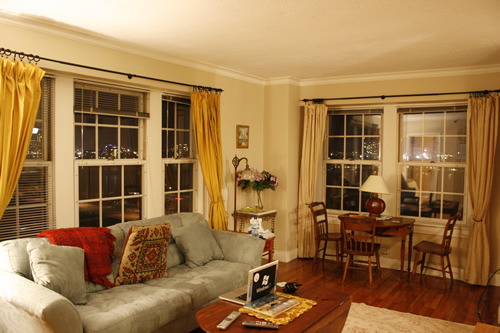
Whilst there, I stayed in a wonderful apartment on the 9th floor of an apartment block, just south of the river, that I found on airbnb.co.uk (hotels are extremely expensive in Boston). The apartment cost about £150 a night, but offered amazing views over the Charles, and I could ride into work in less than 10 minutes!

Apartment

My apartment

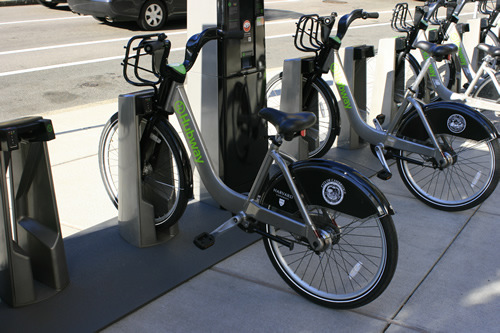
The bikes were exactly the same vehicles as the Barclays hire bikes we have in London.

Hubway Bikes

Hubway Bikes

On the first day there, I grabbed my camera and crossed the bridge over the river and walked along the river bank into Cambridge, eventually found Google, then wandered on. MIT was just up the road, so I passed past some of their buildings – but it still felt very much like a city.

MIT

MIT

I then trekked on to Harvard which felt much more like a university – as there were obvious halls of residences and university buildings.

Harvard

Harvard

I then set my Google Maps (using my pre-paid UK T-Mobile £10 SIM very sparingly!) to Taco Bell, and had a quesadilla there after a 40 min trek to it.

Taco Bell

Taco Bell

Heading south over the river, I took the scenic way back towards my apartment along a spit of land that runs parallel to the shore (the Charles River Esplanade).  See more pictures on flickr.

Charles River Esplanade

Charles River Esplanade

Kilometers travelled: About 13.5km

Matt

Area 47, Austria Trip

I believe this post got deleted, so here it is again:

Earlier this month I attended a gathering of all of the people that do jobs similar to mine at Google. The location of this meet-up was Area 47, Ötztal, Austria. Area 47 is an extreme outdoor activity center, which includes many things like caving, canyoning, climbing and rafting etc, and is surrounded by the stunning scenery of mountains and forests.

Cross Golf

One activity we tried was cross-golf, basically cross-county golf. The challenge: about 10 holes, each with an activity to reduce your score if you placed 1st,2nd or 3rd. Activities included rock stacking, tennis with huge wooden bats and rubber dice etc. After leading near the start, my team fell back during the middle of the game as we golfed around our wooden lodges, but went on to pull ahead and win the game! We won a German/Austrian hat full of sweets for our troubles, which now resides above my desk.

White Water Rafting

We had an amazing time rafting, an activity which I would love to do again. Kitted out in full wetsuit gear including a helmet and floatation jacket, we hit the water with our 8 person raft. Had a brilliant trip down a fairly calm river, with fun rapids in places.


Area 47 also had a water-park style section, including water slides, a water canon, a large cushion of air to jump on, to throw people off into the water, and a ski-slope that you could go down using a body-board style plastic toboggan, which shot you across the water at high speed.

My favourite part of the trip was being able to relax on the porch of our wooden lodge in the Austrian countryside, with the mountains towering above us, and the river flowing past. Would very much like to go back at some point.

Matt


Desk Train Line

Having bought a few more locomotives from eBay lately, thoughts of building a small model railway behind my desk at work started materialising. The shelf behind my desk is only about 1.5m long, with a 1.6m gap between it and another 1.5m shelf. Sounded like a small engineering challenge…

Before:

shelves

After:

Train bridge

Built the bridge out of K’nex! Turned out to be a perfect construction material for this project, and I succeeded in building a bridge to fill the gap between the shelves. Below is the current rolling stock on the small approx 4.5m railway

Santa Fe locos with wagons:

Santa Fe train

Both Santa Fe sets:

Both santa fe trains

Network South East ‘Invincible’ and carriages:

Network South East train

The double headed blue Santa Fe’s head across the bridge with 4 wagons of coal:

Double headed Santa Fe train

That’s all for now!

Matt


Dublin, Ireland – Google Student Ambassador Trip

Apologies for not blogging in a while, I have little free time now!

Half way through August I flew over to Dublin to attend the Google Student Ambassador summit, where I learnt lots about how Google apps like Gmail, Google Docs and Drive and Calendar can help students. I now very much look forward to holding events at uni to promote some of Google’s fantastic products now that I have been made aware of even more of their advantages.

It was also really nice to see another Google office, and I enjoyed talking to the employees that work there, as well as other interns and some of the Google BOLDers that I met a year or so ago. [Google BOLD – Business Opportunities and Leadership Development – was a program that I was lucky enough to get accepted on to in 2011.]

Whilst we were in Ireland, we were also given the chance to learn some Irish River dance - a sort of tap dance, which was fantastic fun and afterwards it left me feeling very cultural!

Matt

HTTP Status Cats

Default server 404 error pages are usually fairly unhelpful to users, so creating a custom one can help a user be less frustrated at a broken link if there are options to get back to the homepage of the site, or a search bar to search for their goal.

404 status cat

As you may have seen, I created my own 404 page, and set it by editing the .htaccess file. Read more about that here. Recently, I stumbled upon the phenomenon of HTTP status cats – see them here. I then edited my 404 page to include one of these to keep my angry, lost users a bit happier.

Matt